7 Pine Script Mistakes That Quietly Break Your Strategy
The seven most common Pine Script mistakes — repainting, lookahead bias, request.security misuse — with broken-vs-fixed code for each.
You spent two weekends building a Pine Script strategy. The backtest looks incredible — 312% return, 71% win rate, max drawdown under 8%. You flip the script to a live chart, paper trade for a week, and the equity curve is flat. Worse than flat — it's losing.
The strategy isn't broken. It was lying to you. Most underperforming Pine Scripts share the same handful of bugs, and almost all of them are silent — they compile, they run, they paint pretty backtests. They just don't survive the transition to live data.
This guide walks through the seven most common Pine Script mistakes, each with broken code, fixed code, and a one-sentence diagnostic so you can find them in your own scripts. None of these are syntax errors. They are logic errors that TradingView's compiler will never warn you about.
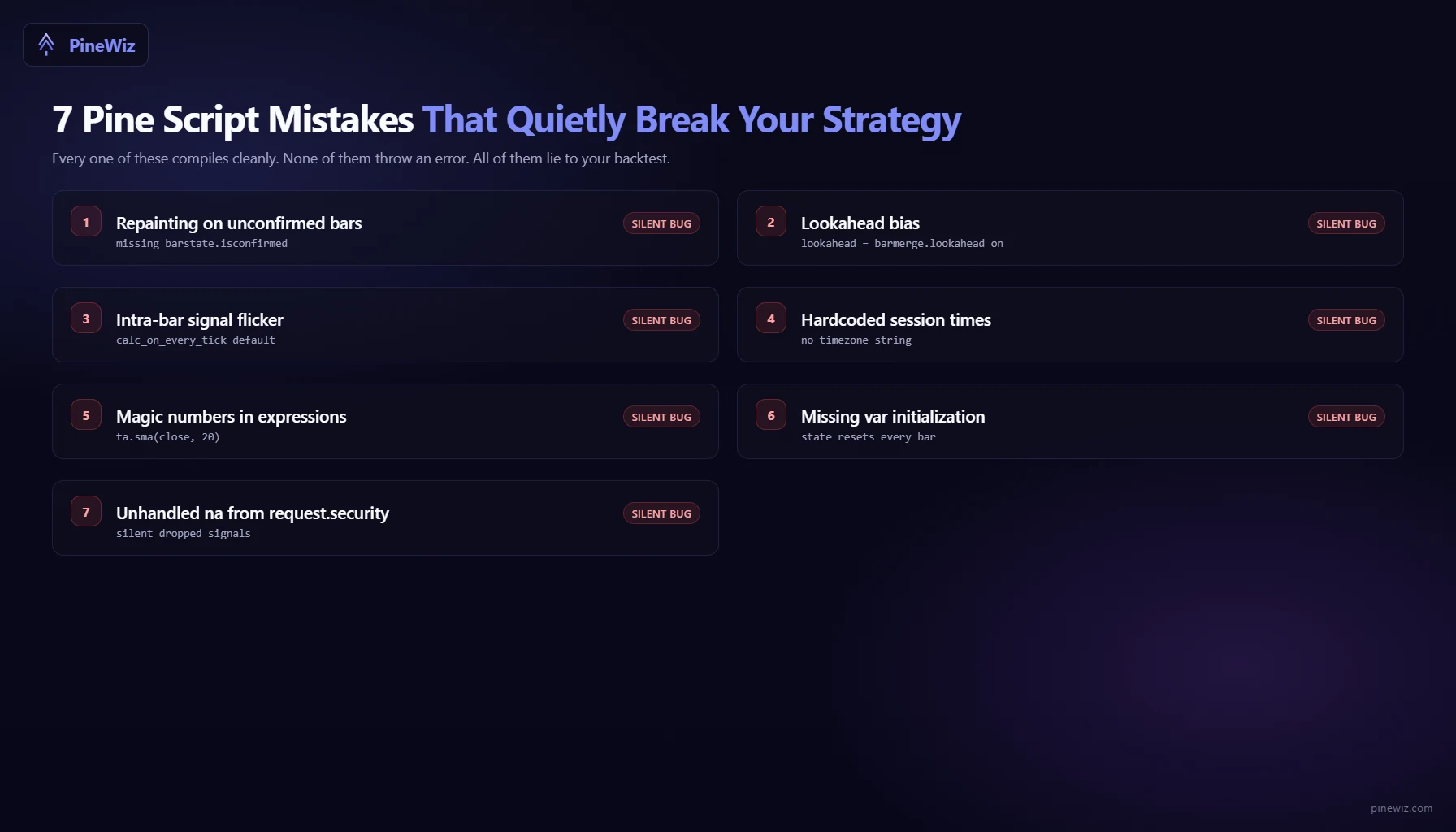
Mistake 1: Repainting
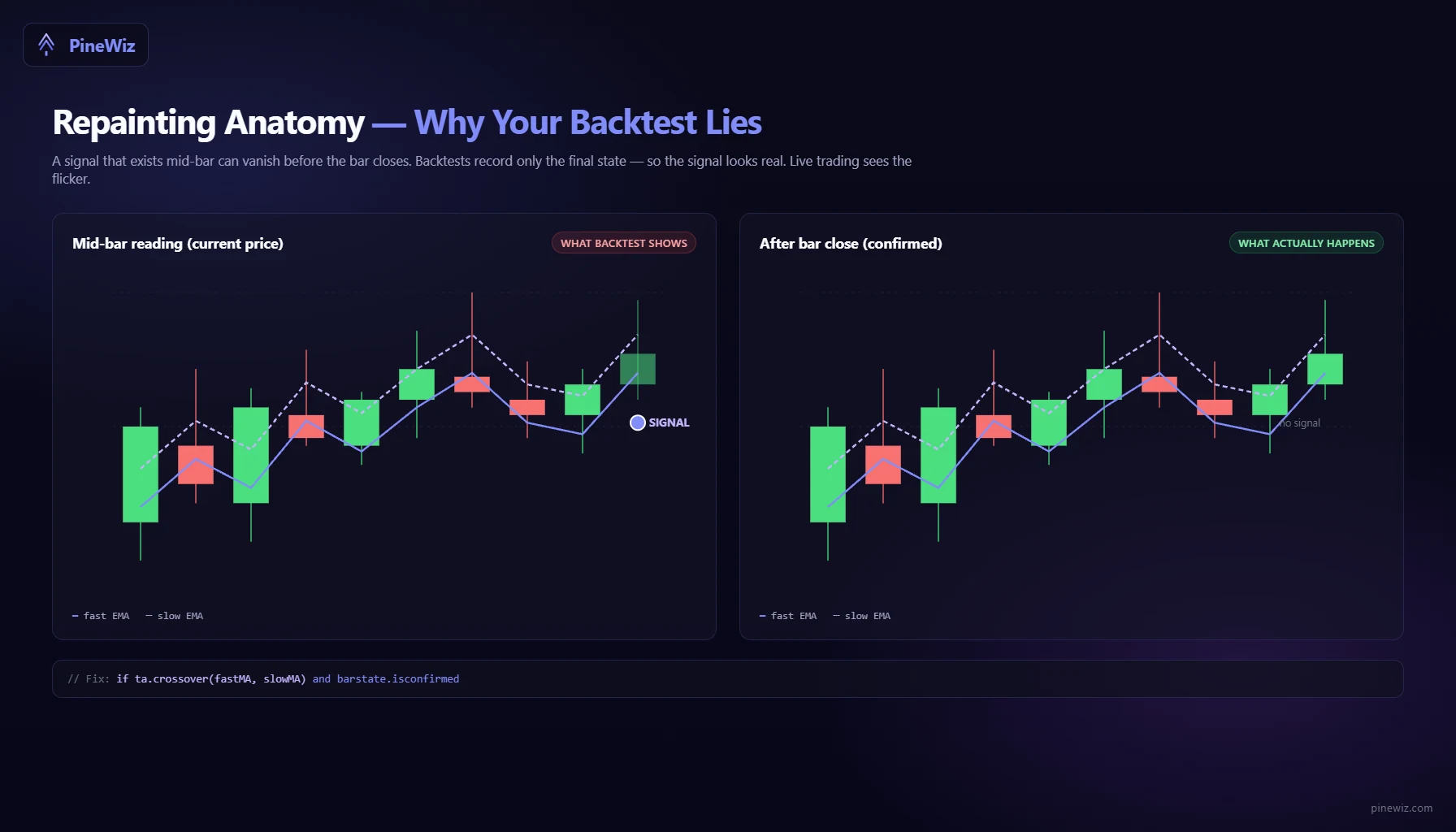
Repainting is the bug where an indicator changes its mind about historical bars after they have closed. The script draws a signal on a bar, then erases or moves it a few bars later. In a backtest, you only ever see the final, repainted version — which makes the strategy look psychic.
The classic source is calculating signals on the current, unclosed bar:
// Broken — uses live bar, repaints
crossUp = ta.crossover(ta.ema(close, 20), ta.ema(close, 50))
if crossUp
    strategy.entry("Long", strategy.long)
The cross is detected mid-bar. If price reverses before the bar closes, the cross disappears — and so does the signal. In backtest, only the final state is recorded. In live trading, you'd have entered and exited mid-bar based on flickering data.
// Fixed — confirm on bar close
crossUp = ta.crossover(ta.ema(close, 20), ta.ema(close, 50))
if crossUp and barstate.isconfirmed
    strategy.entry("Long", strategy.long)
Diagnostic: load the script on a live chart, screenshot it, wait an hour, screenshot again. Any signal that moves, deletes, or repositions is a repaint. Throw the script out and rewrite.
Mistake 2: Lookahead Bias with request.security
request.security is one of the most useful functions in Pine Script — and one of the easiest to misuse. The default behavior pulls higher-timeframe data on bar close, which is correct. The lookahead = barmerge.lookahead_on flag pulls the not-yet-closed bar's data, which is fictional.
// Broken — peeks at unclosed daily bar
dailyClose = request.security(syminfo.tickerid, "D", close,
                              lookahead = barmerge.lookahead_on)
if close > dailyClose
    strategy.entry("Long", strategy.long)
In a backtest, this looks brilliant. The script "knows" the daily close before it happens and enters on every bar where the intraday price is below it. In live trading, the daily close doesn't exist yet — the function returns garbage.
// Fixed — wait for the higher-timeframe bar to close
dailyClose = request.security(syminfo.tickerid, "D", close[1],
                              lookahead = barmerge.lookahead_off)
if close > dailyClose
    strategy.entry("Long", strategy.long)
The close[1] offset and the explicit lookahead_off together guarantee you only reference confirmed historical bars.
Diagnostic: if your backtest results are noticeably better than your live results on the same script with no other changes, lookahead bias is the first thing to check.
Mistake 3: Missing barstate.isconfirmed Filter
Pine Script v5 and v6 execute on every tick by default for strategies. That means your strategy logic runs hundreds of times per bar — once for each price update — before the bar finally closes.
Without a confirmation filter, you can place an order, cancel it, place another, cancel it, all within a single bar. Your backtest looks clean (it only records final states), but live trading produces chaotic order flow that the backtest never anticipated.
// Broken — fires intra-bar
if ta.crossover(close, ta.sma(close, 20))
    strategy.entry("Long", strategy.long)

// Fixed — only act on bar close
if ta.crossover(close, ta.sma(close, 20)) and barstate.isconfirmed
    strategy.entry("Long", strategy.long)
Alternatively, set calc_on_every_tick = false in your strategy() declaration — but barstate.isconfirmed is the more explicit fix and makes intent obvious to any future reader.
Mistake 4: Hardcoded Session Times Without Timezone
Pine Script does not assume a timezone. If you write time(timeframe.period, "0930-1600") thinking it means "New York market hours," you are wrong on every chart whose exchange isn't on US/Eastern. The script silently uses the chart's local time, so the same code behaves differently on NSE, LSE, and NYSE charts.
// Broken — ambiguous timezone
inSession = not na(time(timeframe.period, "0930-1600"))

// Fixed — pin the timezone explicitly
inSession = not na(time(timeframe.period, "0930-1600", "America/New_York"))
This bug is especially nasty in backtests run across multiple instruments. Half your trades fire at the wrong session because the chart's timezone shifted. You won't notice until you compare slippage and fill quality between symbols.
Mistake 5: Magic Numbers Instead of Inputs
Hardcoding parameters into ta.sma(close, 20) or input = 14 directly in expressions makes a script impossible to optimize. You can't backtest with different parameters without editing the source.
// Broken — locked-in parameters
fast = ta.ema(close, 12)
slow = ta.ema(close, 26)
signal = ta.ema(fast - slow, 9)

// Fixed — exposed as inputs
fastLen = input.int(12, "Fast EMA length", minval=1)
slowLen = input.int(26, "Slow EMA length", minval=1)
sigLen  = input.int(9,  "Signal EMA length", minval=1)
fast = ta.ema(close, fastLen)
slow = ta.ema(close, slowLen)
signal = ta.ema(fast - slow, sigLen)
Beyond optimization, exposing inputs lets you tune the strategy from the TradingView UI without redeploying. The cost is two extra lines per parameter — worth it every time.
Mistake 6: Missing var Initialization
Variables declared inside a script's main flow re-initialize on every bar. If you want a value to persist — a running counter, a stored entry price, a streak count — you need var.
// Broken — counter resets every bar
streak = 0
if close > close[1]
    streak := streak + 1

// Fixed — var persists across bars
var streak = 0
streak := close > close[1] ? streak + 1 : 0
This is the same mistake in reverse: forgetting to reset a var when you actually wanted it to. If you store a stop-loss level in a var and never clear it on exit, the next trade inherits the old stop. Trades miss exits silently and the equity curve diverges from the chart visuals.
Mistake 7: Plotting Without na Handling
A script that uses request.security or any function with possible na returns will draw garbage when the data is missing. Worse, conditional logic involving na evaluates to na itself — which is treated as false in comparisons.
// Broken — na flows through silently
htfRSI = request.security(syminfo.tickerid, "D", ta.rsi(close, 14))
if htfRSI > 70
    label.new(bar_index, high, "Overbought")

// Fixed — explicit na guard
htfRSI = request.security(syminfo.tickerid, "D", ta.rsi(close, 14))
if not na(htfRSI) and htfRSI > 70
    label.new(bar_index, high, "Overbought")
The not na() check is one of the cheapest defensive habits in Pine Script. Use it on any series that crosses a higher timeframe boundary or any custom function that can return na partway through the chart.
How to Audit Your Existing Scripts
Run this checklist on every Pine Script you've written:
- Is every signal gated by
barstate.isconfirmed? - Is every
request.securitycall usinglookahead = barmerge.lookahead_offand a[1]historical offset? - Are all session times pinned to an explicit timezone string?
- Are all numeric parameters exposed as
input.intorinput.float? - Are persistent variables declared with
var? - Are all
request.securityoutputs guarded withnot na(...)? - Does the script render the same on a static historical chart and a live chart with replay turned on?
If any of these fail, you have a candidate bug. Fix it before trusting another backtest result.
The Faster Way to Get Bug-Free Pine Script
Hand-writing Pine Script means hand-writing every one of these defensive checks. Miss one and the strategy ships with a silent bug. Catch one in production and you've already lost real capital.
PineWiz generates Pine Script that includes barstate.isconfirmed gates, explicit timezone strings, not na guards, and var declarations by default. Describe your strategy in plain English — "EMA crossover with ATR-based stop and a 9:30-16:00 New York session filter" — and the output already follows the defensive patterns in this guide. The seven mistakes above are exactly the ones the underlying templates are designed to avoid.
PineWiz Team
The PineWiz team specializes in Pine Script and algorithmic trading. We build AI tools that help retail traders turn their ideas into production-ready TradingView strategies and indicators — no coding required.
Ready to bring your idea to life?
Turn your trading ideas into Pine Script code without writing a single line.
Start Building