Pine Script Order Block Indicator: Working Code + AI Variant in 30 Seconds
Build an order block indicator in Pine Script — full working code, plus how to generate variations with PineWiz in under 30 seconds.
Open any trading channel on YouTube and you'll find a video promising the "ultimate order block indicator." Most are paywalled. Most repaint. Most lie about lookahead bias. The actual logic — what makes a candle an order block — is straightforward enough to write yourself in about 60 lines of Pine Script.
This guide walks through the full code: what an order block is, the detection logic, the complete script, and three variations (mitigated, breaker, internal) that cover most ICT-style setups. The version you build here will not repaint and will not use lookahead.
What an Order Block Actually Is
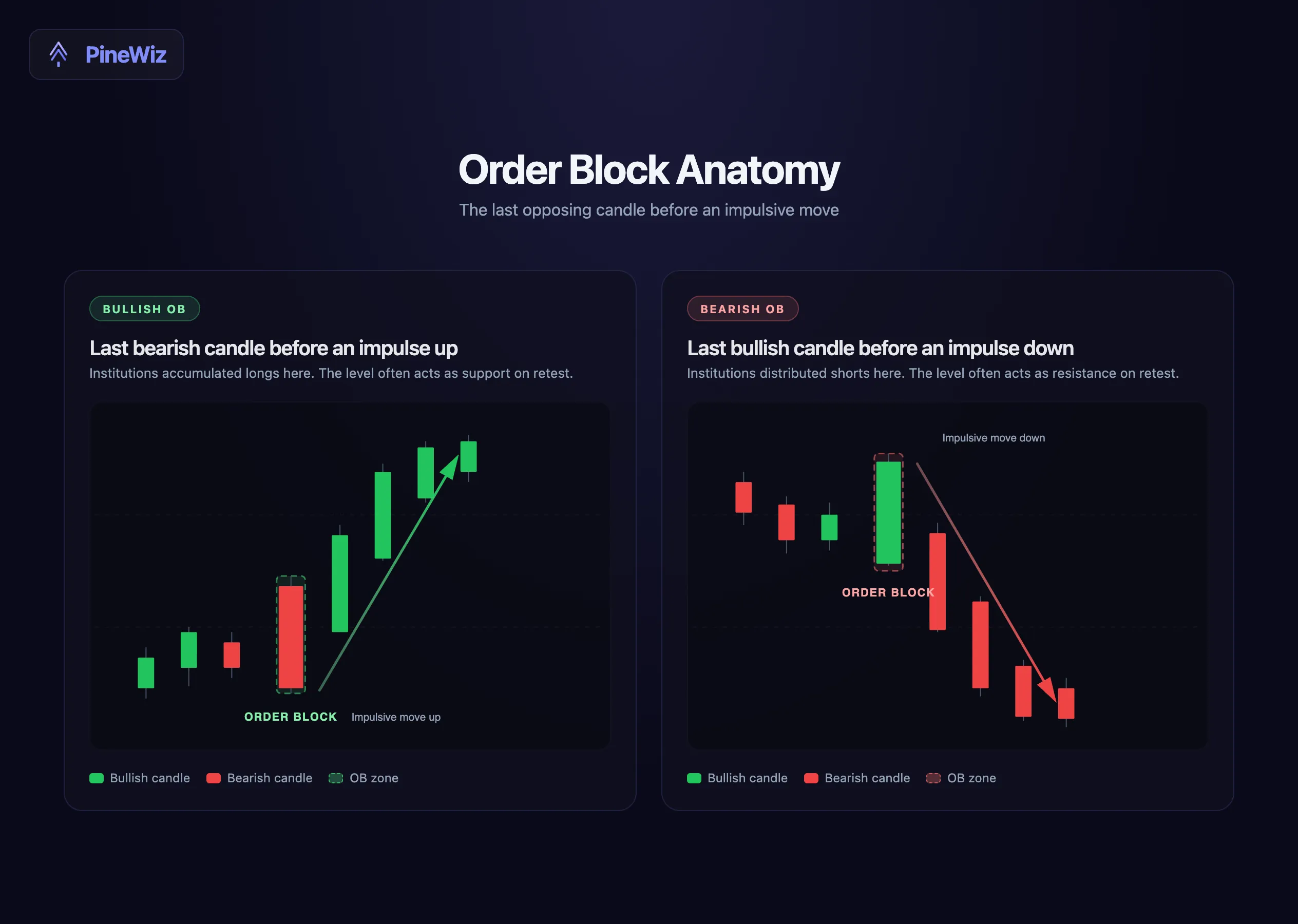
An order block is the last opposing candle before an impulsive move in the opposite direction. That is the entire definition.
A bullish order block is the last bearish candle before a sharp move up. The logic: institutions accumulated long positions inside that down candle, and price was driven higher immediately after. When price returns to that zone, those institutions defend their fills, so the level often acts as support.
A bearish order block is the mirror — the last bullish candle before a sharp move down.
The strength of an order block is judged by what came after it, not what came before. A bearish candle followed by a 2% rally in the next three bars is a strong bullish order block. A bearish candle followed by sideways chop is not an order block at all — just a red bar.
The Detection Logic
Three conditions define a valid order block in code:
- Direction. The candidate candle must be the opposite color of the move that follows. Bullish OB equals down candle; bearish OB equals up candle.
- Impulse confirmation. The next N bars (typically 3) must show a strong displacement in the opposite direction. The threshold is usually a percentage of the candidate candle's range or an ATR multiple.
- No break in continuity. The impulsive move must start immediately. If price chops sideways for two bars before moving, the candidate is not the actual origin — find the more recent opposing candle inside the chop.
The detection runs on every bar but only confirms the order block N bars later, when the impulse is verifiable. This is what prevents repainting: the indicator never changes its mind about a historical OB once confirmed.
The Full Pine Script Code
This is a complete, working order block indicator. Paste it into TradingView, click Save, and add to chart.
//@version=6
indicator("Order Block Indicator", overlay=true, max_boxes_count=100)

// Inputs
lookback = input.int(3, "Bars to confirm impulse", minval=1, maxval=10)
impulseAtr = input.float(1.5, "Impulse size (ATR multiple)", minval=0.5, step=0.1)
showBullish = input.bool(true, "Show Bullish OBs")
showBearish = input.bool(true, "Show Bearish OBs")
bullColor = input.color(color.new(color.green, 80), "Bullish OB color")
bearColor = input.color(color.new(color.red, 80), "Bearish OB color")

// ATR for impulse threshold
atrValue = ta.atr(14)

// Candidate detection — looks back N bars
isCandidateBearish = close[lookback] < open[lookback]
isCandidateBullish = close[lookback] > open[lookback]

// Impulse measurement from the candidate close
moveUp = high - close[lookback]
moveDown = close[lookback] - low

// Confirmation conditions
bullOBConfirmed = isCandidateBearish and moveUp > atrValue[lookback] * impulseAtr
bearOBConfirmed = isCandidateBullish and moveDown > atrValue[lookback] * impulseAtr

// Draw bullish OB box
if bullOBConfirmed and showBullish
    box.new(left=bar_index - lookback, top=high[lookback],
            right=bar_index + 20, bottom=low[lookback],
            bgcolor=bullColor, border_color=color.new(color.green, 50))

// Draw bearish OB box
if bearOBConfirmed and showBearish
    box.new(left=bar_index - lookback, top=high[lookback],
            right=bar_index + 20, bottom=low[lookback],
            bgcolor=bearColor, border_color=color.new(color.red, 50))

// Alerts
alertcondition(bullOBConfirmed, "Bullish Order Block", "Bullish OB confirmed")
alertcondition(bearOBConfirmed, "Bearish Order Block", "Bearish OB confirmed")
The script draws translucent boxes around confirmed order blocks. Each box extends 20 bars into the future, giving you a visual zone to watch as price approaches.
The lookback input controls how many bars must elapse before an OB is confirmed. Default 3 catches most impulsive moves. Increasing it reduces false positives but also reduces the number of OBs drawn.
The impulseAtr input controls how strong the move must be relative to recent volatility. Default 1.5x ATR is conservative — strong enough to filter out chop, lenient enough to catch typical ICT setups.
Three Common Variations
The basic version above identifies all order blocks. Most ICT traders use one of three variations.
Mitigated Order Blocks
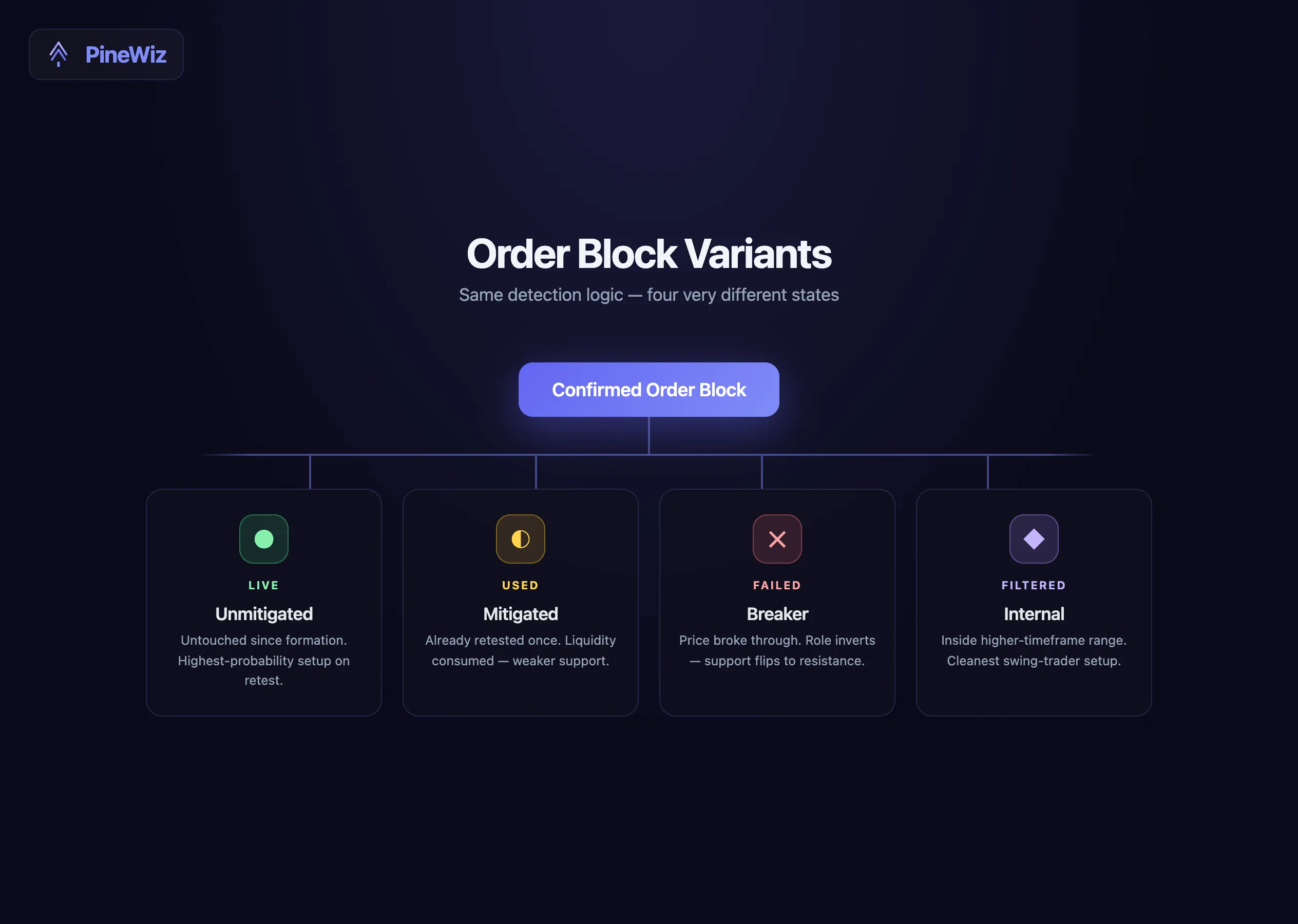
A mitigated order block is one that has already been retested by price. The original liquidity has been "mitigated" — institutions filled their orders, and the level is no longer pristine.
To track mitigation, add a check for whether price has revisited the OB zone since it was created. Mitigated OBs are usually drawn in a faded color or removed entirely from the chart.
Breaker Blocks
A breaker block is an order block that failed — price broke through it instead of bouncing. When that happens, the same level often acts as resistance going forward (if it was a bullish OB) or support (if bearish). The role flips.
To code a breaker block, watch for a strong close beyond the OB's opposite boundary. Once that close is confirmed, recolor the box and treat it as opposite-direction supply or demand.
Internal Order Blocks
An internal order block is the last opposing candle inside a higher-timeframe range. Instead of using all order blocks across the chart, internal OBs only appear within a defined structure — for example, between the most recent swing high and swing low.
This is the cleanest version for swing traders. It cuts visual noise dramatically and aligns the indicator with classic SMC market-structure logic.
The Repainting Problem
Most order block indicators on TradingView repaint. The script draws a box, then a few bars later moves it or deletes it because the "confirmation" logic was built using lookahead = barmerge.lookahead_on or fetched data from inside the current bar.
The version above does not repaint, because the candidate detection looks back lookback bars and the confirmation only completes after that lookback window has fully closed. Once the box is drawn, it never changes.
To verify any indicator is non-repainting, do one test: load it on a live chart, take a screenshot, wait an hour, take another screenshot. If any boxes have moved, deleted, or relocated, the script repaints. Throw it out.
Lookahead Bias: Why Many Indicators Lie
Lookahead bias is when an indicator uses information from future bars to decide what to draw on the current bar. In backtests, this looks like a goldmine — the indicator catches every move with eerie accuracy. In live trading, it produces nothing, because future data does not exist yet.
The two main sources of lookahead bias in Pine Script:
request.security()withlookahead = barmerge.lookahead_on. This pulls higher-timeframe data that has not closed yet. Anything calculated from it is fictional.- Implicit forward references. Repainting plots that recalculate on bar close effectively peek at future data.
The order block code above uses neither. It only references confirmed historical bars (close[lookback]) and waits the full lookback period before drawing. What you see on the chart is what would have appeared in real time.
Building Custom Variants Without the Manual Code
The script above is a strong starting point. Most traders end up wanting variations: a confluence filter that only shows OBs aligned with a moving average, a volume filter that ranks OBs by the size of the impulse move, or a multi-timeframe version that only draws daily OBs on the 15-minute chart.
Each variant is another 20-50 lines of Pine Script. Each one is fragile if you miss an if block or mistype an array index.
The faster path: describe the variant in plain English in PineWiz. "Same order block logic, but only show bullish OBs when price is above the 200 EMA, and color them by impulse strength." You get a working script in seconds, not the 30 minutes it takes to hand-edit.
The same applies to mitigated, breaker, and internal variants. Each one is a one-line change in the PineWiz prompt — no manual conversion, no debugging.
From Indicator to Strategy
An order block indicator paints zones. It does not place trades. To backtest an order block strategy, you need to convert the indicator into a strategy: define entries on retests, set stop losses below the box low, define take profits or trailing exits, and set position sizing.
That is the next step for most traders. We covered the full conversion process — the six-step manual checklist plus the AI shortcut — in the indicator-to-strategy conversion guide.
Get Your Custom Order Block Variant
The code in this article is yours to keep. Paste it into TradingView and trade the basic version. But if you want a confluence filter, a multi-timeframe stack, or a strategy version that backtests automatically, the manual route is slow.
Describe the variant you want in PineWiz, get the code in 30 seconds, paste it into TradingView. The same flow works for any indicator you read about and want a customized version of — order blocks, fair value gaps, liquidity sweeps, support and resistance.
PineWiz Team
The PineWiz team specializes in Pine Script and algorithmic trading. We build AI tools that help retail traders turn their ideas into production-ready TradingView strategies and indicators — no coding required.
Ready to bring your idea to life?
Turn your trading ideas into Pine Script code without writing a single line.
Start Building