How to Create a Pine Script RSI Strategy (Step-by-Step Guide)
Learn how to build a Pine Script RSI strategy for TradingView. From basic overbought/oversold signals to advanced RSI divergence detection.
What RSI Actually Measures
The Relative Strength Index is one of the most widely used indicators in technical analysis — and for good reason. RSI measures momentum, identifies overbought and oversold conditions, and can signal potential reversals before they happen. But knowing what RSI does and knowing how to code it into a Pine Script strategy are two very different skills.
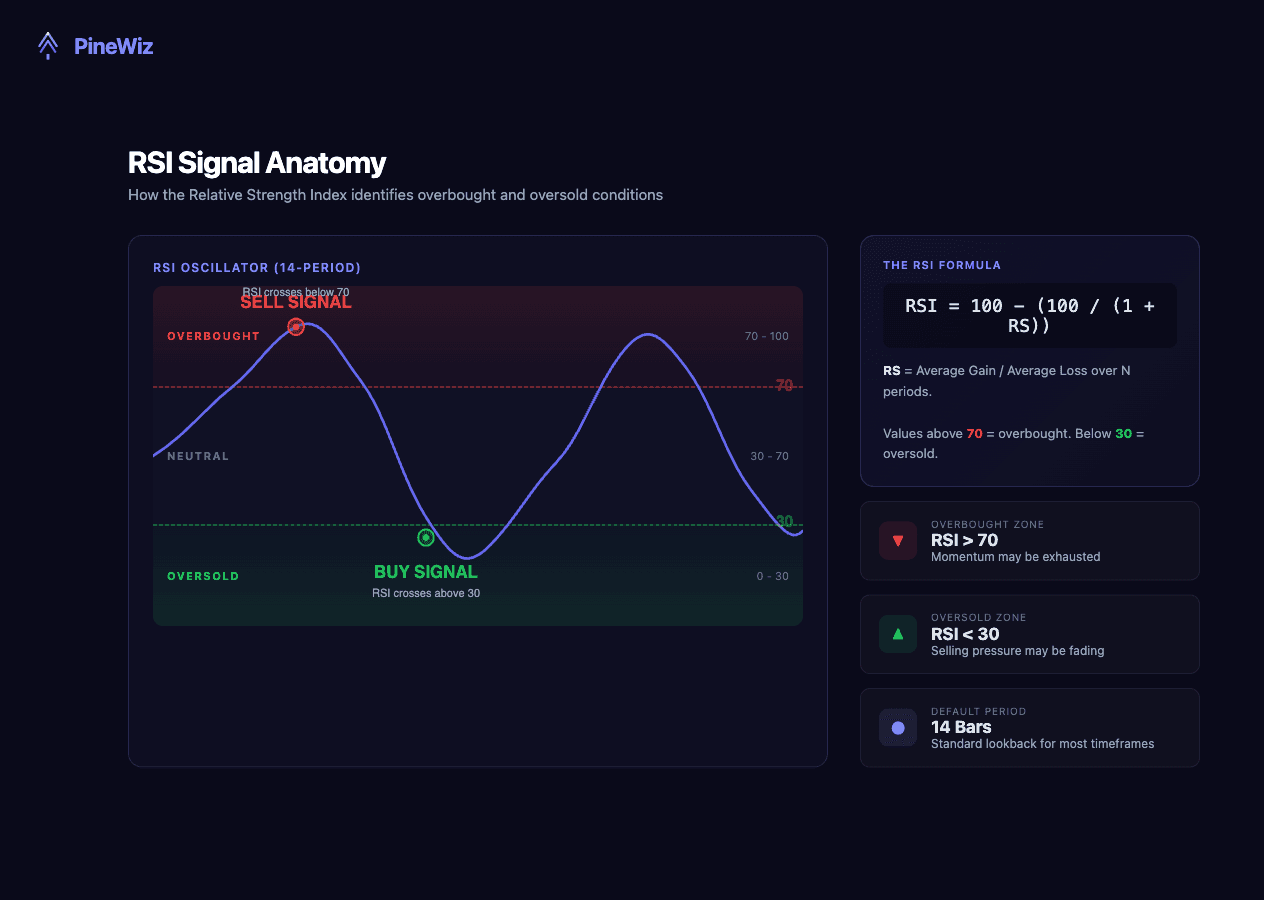
RSI was developed by J. Welles Wilder in 1978. It calculates the ratio of recent gains to recent losses over a specified period (default: 14 bars) and outputs a value between 0 and 100. The formula is straightforward:
RSI = 100 - (100 / (1 + RS))
Where RS (Relative Strength) = Average Gain over N periods / Average Loss over N periods. When RSI is above 70, the asset is considered overbought — meaning buying momentum may be exhausted. When RSI is below 30, the asset is considered oversold — meaning selling pressure may be fading. These are guidelines, not guarantees. In a strong uptrend, RSI can stay above 70 for weeks.
Building a Basic Pine Script RSI Strategy
Let's start with the simplest version: buy when RSI crosses below 30 (oversold), sell when RSI crosses above 70 (overbought). Here's what this looks like in Pine Script v6:
//@version=6
strategy("RSI Strategy - Basic", overlay=true)

// Inputs
rsiLength = input.int(14, "RSI Length", minval=1)
overbought = input.int(70, "Overbought Level")
oversold = input.int(30, "Oversold Level")

// Calculate RSI
rsiValue = ta.rsi(close, rsiLength)

// Entry conditions
longCondition = ta.crossover(rsiValue, oversold)
shortCondition = ta.crossunder(rsiValue, overbought)

// Execute trades
if longCondition
    strategy.entry("Long", strategy.long)
if shortCondition
    strategy.close("Long")
This is a mean-reversion strategy. It assumes that when RSI drops below 30, the price is likely to bounce, and when RSI rises above 70, the rally is likely to fade.
The problem? In trending markets, this gets destroyed. A stock in a strong uptrend can stay "overbought" for months while the price doubles. You need filters.
Adding Moving Average Confirmation
One of the most effective ways to filter bad RSI signals is to add a trend filter. A simple moving average tells you the direction of the broader trend so you only take RSI signals that align with it.
//@version=6
strategy("RSI + MA Strategy", overlay=true)

// Inputs
rsiLength = input.int(14, "RSI Length")
maLength = input.int(50, "MA Length")
overbought = input.int(70, "Overbought")
oversold = input.int(30, "Oversold")

// Calculations
rsiValue = ta.rsi(close, rsiLength)
maValue = ta.sma(close, maLength)

// Only go long when price is above the MA (uptrend)
longCondition = ta.crossover(rsiValue, oversold) and close > maValue

// Only exit when RSI is overbought or price drops below MA
exitCondition = ta.crossunder(rsiValue, overbought) or close < maValue

if longCondition
    strategy.entry("Long", strategy.long)
if exitCondition
    strategy.close("Long")
The logic: only take oversold RSI signals when the broader trend is up (price above the 50 SMA). This single filter eliminates a large number of losing trades in downtrending markets.
Backtesting data backs this up. Studies have found that RSI strategies with trend confirmation produced significantly higher win rates than raw RSI signals alone, with some configurations reaching above 75% accuracy on major indices.
Choosing the Right RSI Settings for Your Timeframe
The default RSI period of 14 works well for daily charts, but it's not one-size-fits-all. Different timeframes demand different settings to balance sensitivity and reliability.
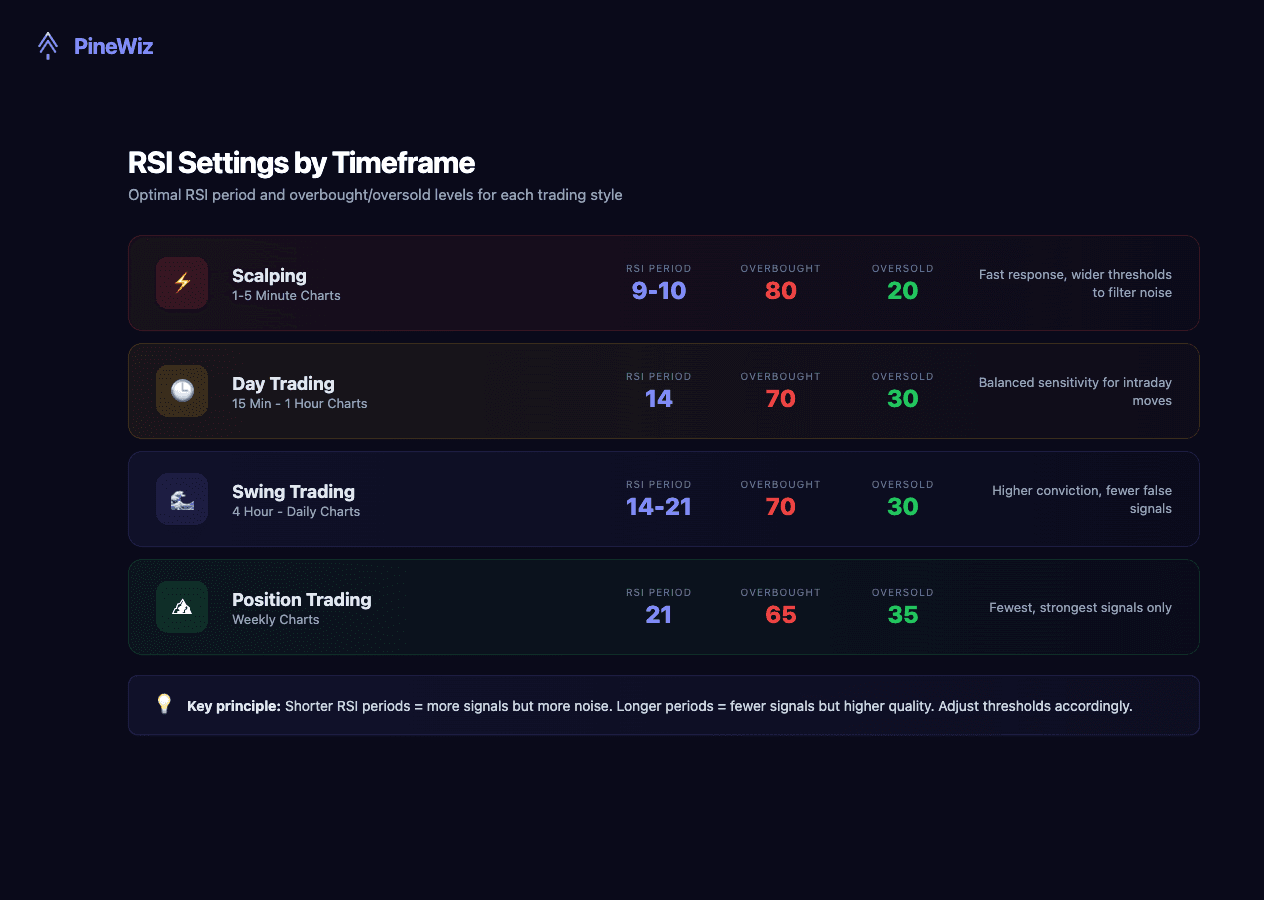
- Scalping (1-5 minute charts): Use RSI(9) or RSI(10) with tighter levels at 80/20. The shorter period responds faster to price changes, and the wider threshold filters out the noise that dominates short timeframes.
- Day trading (15-min to 1-hour): RSI(14) with standard 70/30 levels is a solid starting point. Some traders prefer RSI(10) with 75/25 for slightly more responsiveness.
- Swing trading (4-hour to daily): The default RSI(14) at 70/30 works well. For more conservative signals, try RSI(21) which smooths out daily volatility.
- Position trading (weekly): RSI(14) or RSI(21) with 65/35 levels. On weekly charts, you want fewer but higher-conviction signals.
The key principle: shorter RSI periods generate more signals but more false positives. Longer periods generate fewer signals but higher quality ones. Adjust the overbought/oversold thresholds accordingly.
Adding Risk Management to Your RSI Strategy
No strategy survives without proper risk management. Here's how to add a stop loss and take profit to the RSI strategy:
//@version=6
strategy("RSI Strategy with Risk Management", overlay=true,
         default_qty_type=strategy.percent_of_equity,
         default_qty_value=10,
         initial_capital=10000,
         commission_type=strategy.commission.percent,
         commission_value=0.1)

// Inputs
rsiLength = input.int(14, "RSI Length")
maLength = input.int(50, "MA Length")
stopLossPct = input.float(2.0, "Stop Loss %") / 100
takeProfitPct = input.float(4.0, "Take Profit %") / 100

// Calculations
rsiValue = ta.rsi(close, rsiLength)
maValue = ta.sma(close, maLength)

// Entry
longCondition = ta.crossover(rsiValue, 30) and close > maValue
if longCondition
    strategy.entry("Long", strategy.long)
    strategy.exit("Exit", "Long",
         stop=close * (1 - stopLossPct),
         limit=close * (1 + takeProfitPct))
This version includes realistic backtesting parameters: 10% position sizing, $10,000 initial capital, and 0.1% commission. The 2:1 reward-to-risk ratio (4% take profit vs. 2% stop loss) means you only need to win about 35% of trades to break even — well within the range of a filtered RSI strategy.
Common RSI Strategy Mistakes to Avoid
Even experienced traders fall into these traps when building RSI strategies. Here's what to watch out for — and how to fix each one.

- Treating overbought as an automatic sell signal. An RSI above 70 doesn't mean the price will drop. In strong uptrends, RSI can stay above 70 for extended periods while the price continues climbing. Instead of selling at 70, look for RSI to cross back below 70, or use it as a warning to tighten your stop — not exit immediately.
- Using RSI as a standalone indicator. RSI tells you about momentum, but it says nothing about trend direction, volume, or support/resistance. Pair it with at least one other tool — a moving average for trend, volume for confirmation, or key price levels for context.
- Using default settings on every timeframe. RSI(14) with 70/30 is a starting point, not a universal solution. A 5-minute chart with default settings will generate dozens of signals per day, most of them noise. Adjust the period and thresholds based on your timeframe and the asset's volatility.
- Ignoring RSI divergence. When price makes a new high but RSI makes a lower high, that's bearish divergence — a warning that momentum is weakening. These signals are among the most reliable RSI provides, yet many traders focus only on overbought/oversold levels and miss them entirely.
- No stop loss. Every RSI signal can fail. Without a stop loss, a single bad trade can erase weeks of gains. Define your risk before entering every trade.
How to Backtest Your RSI Strategy Effectively
Writing the strategy is only half the work. Proper backtesting separates profitable strategies from ones that only look good on paper.
- Use realistic settings. Always set commission (0.05-0.2%), slippage, and initial capital. A strategy that shows 500% returns with zero commission will look very different with real trading costs.
- Test across different market conditions. Your RSI strategy should be tested in uptrends, downtrends, and sideways markets. If it only works in one regime, it's not robust — it's curve-fitted.
- Check the number of trades. A strategy with a 95% win rate but only 8 trades over 5 years tells you nothing. You need at least 30-50 trades for statistical significance, ideally more.
- Watch for overfitting. If you optimized your RSI period to 11, your overbought level to 73, and your stop loss to 2.3% — ask yourself: would these exact numbers work on a different asset or time period? If not, you've probably over-optimized for historical data.
- Use TradingView's Strategy Tester. Once you paste your Pine Script, click the "Strategy Tester" tab. Review the performance summary, trade list, and equity curve. Pay attention to max drawdown — a strategy that returns 40% but draws down 35% is much riskier than one that returns 25% with a 10% drawdown.
Build Your Pine Script RSI Strategy Without Writing Code
Understanding RSI strategy logic matters whether you code by hand or not. But the reality is that most traders have strategy ideas they never test because coding feels like a barrier.
That's where PineWiz comes in. Describe your RSI strategy in plain English — "buy when RSI crosses below 30, price is above the 50 SMA, with a 2% stop loss and 4% take profit" — and PineWiz generates the complete Pine Script in seconds. No syntax to memorize, no brackets to debug.
You can then paste the code directly into TradingView, run a backtest, and refine through conversation: "Add a volume filter," "Change the RSI period to 10," "Only trade during US market hours."
The strategies in this guide? You could build any of them in under 60 seconds with PineWiz — and then spend your time on what actually matters: analyzing the results and finding your edge.
PineWiz Team
The PineWiz team specializes in Pine Script and algorithmic trading. We build AI tools that help retail traders turn their ideas into production-ready TradingView strategies and indicators — no coding required.
Ready to bring your idea to life?
Turn your trading ideas into Pine Script code without writing a single line.
Start Building