How to Build a Support & Resistance Indicator in Pine Script
Learn how to build a Pine Script support and resistance indicator that auto-detects key levels using pivot points on TradingView.
What Support and Resistance Actually Mean
Support and resistance levels are the backbone of technical analysis. Every trader draws them, but most do it manually — scanning charts, dragging lines, and second-guessing whether a level is "real." What if your indicator could detect these levels automatically, update in real time, and highlight the zones that actually matter?
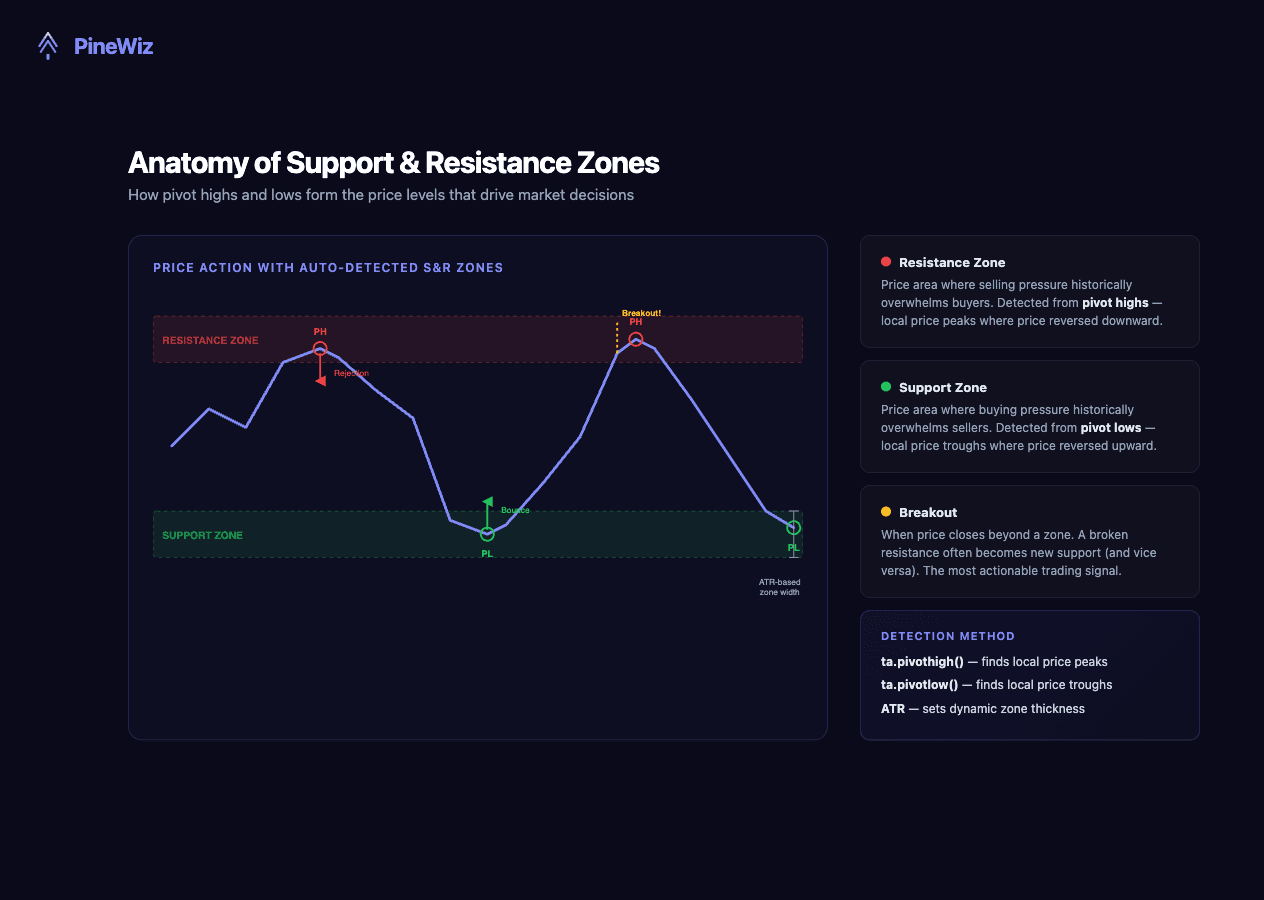
Support is a price area where buying pressure has historically overwhelmed selling pressure, causing price to bounce upward. Resistance is the opposite — a zone where sellers have consistently pushed price back down. These aren't magic lines. They're footprints of market psychology.
The key insight for building an indicator: support and resistance levels cluster around pivot points — local highs and lows where price reversed direction. Detect the pivots, and you've found the levels.
Detecting Pivot Points with ta.pivothigh() and ta.pivotlow()
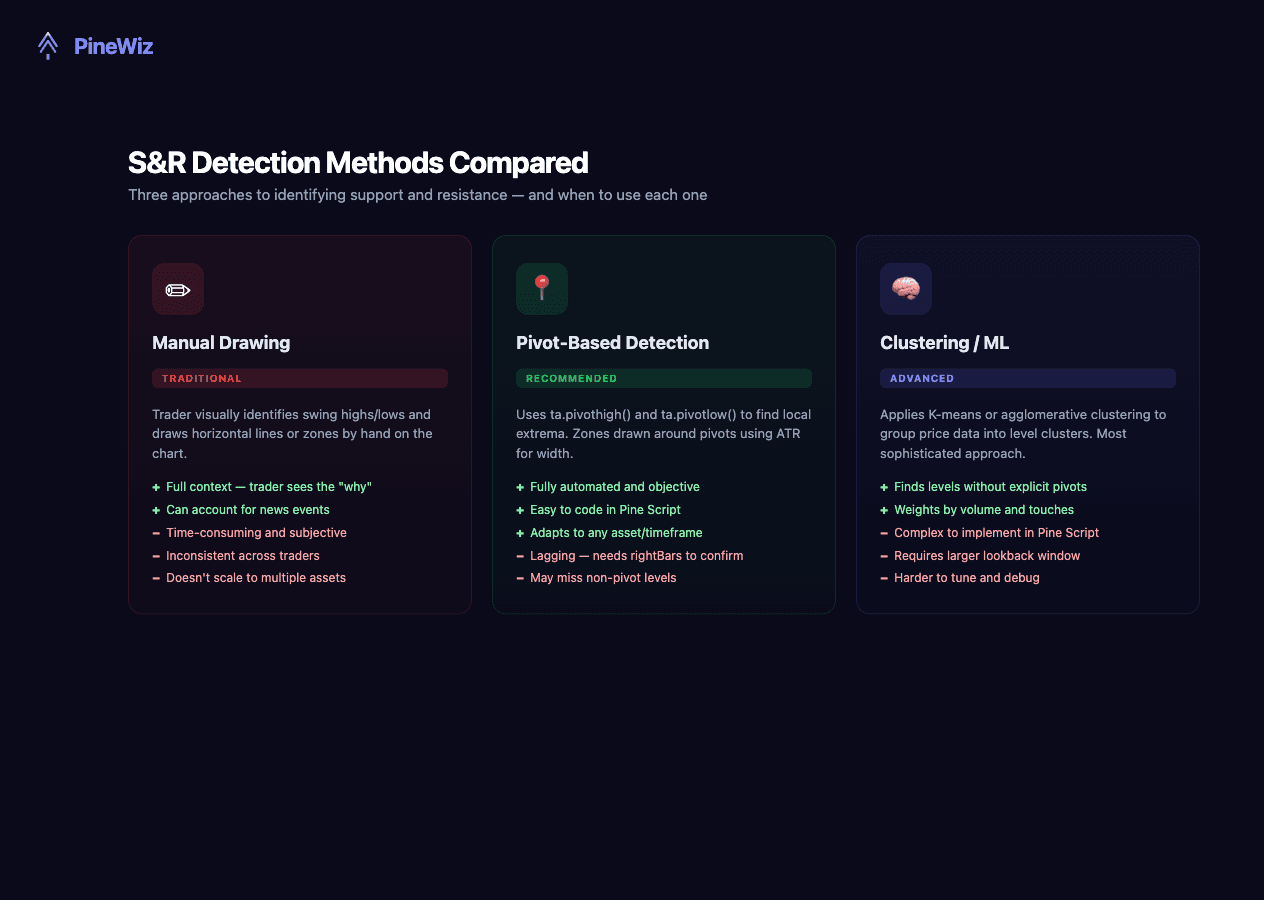
Pine Script has built-in functions specifically designed for pivot detection. These are the foundation of our support and resistance indicator.
//@version=6
indicator("S&R Levels - Pivot Based", overlay=true, max_lines_count=500)

// Inputs
leftBars  = input.int(10, "Left Bars", minval=1)
rightBars = input.int(10, "Right Bars", minval=1)

// Detect pivot highs and lows
pivotHigh = ta.pivothigh(high, leftBars, rightBars)
pivotLow  = ta.pivotlow(low, leftBars, rightBars)

// Plot markers where pivots are detected
plotshape(pivotHigh, title="Pivot High", style=shape.triangledown,
          location=location.abovebar, color=color.red,
          offset=-rightBars, size=size.small)
plotshape(pivotLow, title="Pivot Low", style=shape.triangleup,
          location=location.belowbar, color=color.green,
          offset=-rightBars, size=size.small)
ta.pivothigh(high, leftBars, rightBars) checks if the high price at rightBars bars ago was higher than all bars to its left and right. The leftBars and rightBars parameters control sensitivity — smaller values (5-10) detect more pivots, larger values (15-20) only catch major swings.
Drawing Support and Resistance Lines
Detecting pivots is step one. The real value comes from extending those levels as horizontal lines so you can see where price might react in the future.
//@version=6
indicator("S&R Lines", overlay=true, max_lines_count=500)

// Inputs
leftBars   = input.int(10, "Left Bars", minval=1)
rightBars  = input.int(10, "Right Bars", minval=1)
maxLines   = input.int(5, "Max Lines Per Side", minval=1, maxval=20)

// Detect pivots
pivotHigh = ta.pivothigh(high, leftBars, rightBars)
pivotLow  = ta.pivotlow(low, leftBars, rightBars)

// Arrays to store lines
var line[] resistanceLines = array.new_line()
var line[] supportLines = array.new_line()

// Draw resistance line when pivot high is detected
if not na(pivotHigh)
    ln = line.new(bar_index - rightBars, pivotHigh,
                  bar_index, pivotHigh,
                  extend=extend.right,
                  color=color.new(color.red, 30),
                  width=2, style=line.style_dashed)
    array.push(resistanceLines, ln)
    if array.size(resistanceLines) > maxLines
        line.delete(array.shift(resistanceLines))

// Draw support line when pivot low is detected
if not na(pivotLow)
    ln = line.new(bar_index - rightBars, pivotLow,
                  bar_index, pivotLow,
                  extend=extend.right,
                  color=color.new(color.green, 30),
                  width=2, style=line.style_dashed)
    array.push(supportLines, ln)
    if array.size(supportLines) > maxLines
        line.delete(array.shift(supportLines))
This version stores lines in arrays and automatically removes the oldest ones when the count exceeds maxLines. This keeps your chart clean instead of drowning in historical levels.
Upgrading to Support and Resistance Zones
Professional traders know that support and resistance aren't thin lines — they're zones. A level at $150 might see price bounce at $149.50 one time and $150.80 the next. Here's how to convert pivot-based levels into zones using ATR for dynamic thickness:
//@version=6
indicator("S&R Zones", overlay=true)

// Inputs
leftBars   = input.int(10, "Left Bars")
rightBars  = input.int(10, "Right Bars")
atrLength  = input.int(14, "ATR Length")
zoneMult   = input.float(0.5, "Zone Width (ATR Multiple)", step=0.1)

// Calculations
pivotHigh = ta.pivothigh(high, leftBars, rightBars)
pivotLow  = ta.pivotlow(low, leftBars, rightBars)
atrValue  = ta.atr(atrLength)
zoneWidth = atrValue * zoneMult

// Arrays for zone boxes
var box[] resistanceZones = array.new_box()
var box[] supportZones = array.new_box()

// Draw resistance zone
if not na(pivotHigh)
    bx = box.new(bar_index - rightBars, pivotHigh + zoneWidth,
                 bar_index + 200, pivotHigh - zoneWidth,
                 border_color=color.new(color.red, 60),
                 bgcolor=color.new(color.red, 85))
    array.push(resistanceZones, bx)
    if array.size(resistanceZones) > 5
        box.delete(array.shift(resistanceZones))

// Draw support zone
if not na(pivotLow)
    bx = box.new(bar_index - rightBars, pivotLow + zoneWidth,
                 bar_index + 200, pivotLow - zoneWidth,
                 border_color=color.new(color.green, 60),
                 bgcolor=color.new(color.green, 85))
    array.push(supportZones, bx)
    if array.size(supportZones) > 5
        box.delete(array.shift(supportZones))
The ATR-based zone width is the key innovation. Instead of a fixed pixel width, the zone adapts to the asset's volatility. A stock with 2% daily moves gets wider zones than one with 0.5% moves, making the indicator work consistently across any asset and timeframe.
Adding Breakout and Retest Detection
The most actionable moment in S&R trading is the breakout — when price pushes through a level — and the retest — when price comes back to the broken level. Here's how to add alerts for both:
//@version=6
indicator("S&R with Alerts", overlay=true)

leftBars  = input.int(10, "Left Bars")
rightBars = input.int(10, "Right Bars")

pivotHigh = ta.pivothigh(high, leftBars, rightBars)
pivotLow  = ta.pivotlow(low, leftBars, rightBars)

// Track the most recent support and resistance
var float lastResistance = na
var float lastSupport = na

if not na(pivotHigh)
    lastResistance := pivotHigh
if not na(pivotLow)
    lastSupport := pivotLow

// Breakout detection
resistanceBreakout = not na(lastResistance) and
                     close > lastResistance and
                     close[1] <= lastResistance

supportBreakdown = not na(lastSupport) and
                   close < lastSupport and
                   close[1] >= lastSupport

// Alert conditions
alertcondition(resistanceBreakout,
               "Resistance Breakout",
               "Price broke above resistance")
alertcondition(supportBreakdown,
               "Support Breakdown",
               "Price broke below support")
This tracks the most recent S&R levels and fires an alert the moment price closes beyond them. Set up TradingView notifications to get pinged on your phone — no need to stare at charts all day.
Tuning Your Indicator: Settings That Matter
- Left/Right Bars (Pivot Sensitivity): Values of 5-8 detect minor levels (scalping). Values of 10-15 catch major swings. Values of 20+ flag only significant structural levels for swing trading.
- ATR Length and Zone Multiplier: ATR(14) is standard. Use 0.3-0.5 multiplier for tight zones (day trading) and 0.8-1.2 for wider zones (swing trading). If price frequently pierces your zones without reversing, widen them.
- Max Lines/Zones: Keep between 3 and 7. The most recent levels matter most — older ones are less likely to hold.
Common Support and Resistance Mistakes to Avoid
Building an indicator is one thing. Using it correctly is another. These mistakes trip up even experienced traders.
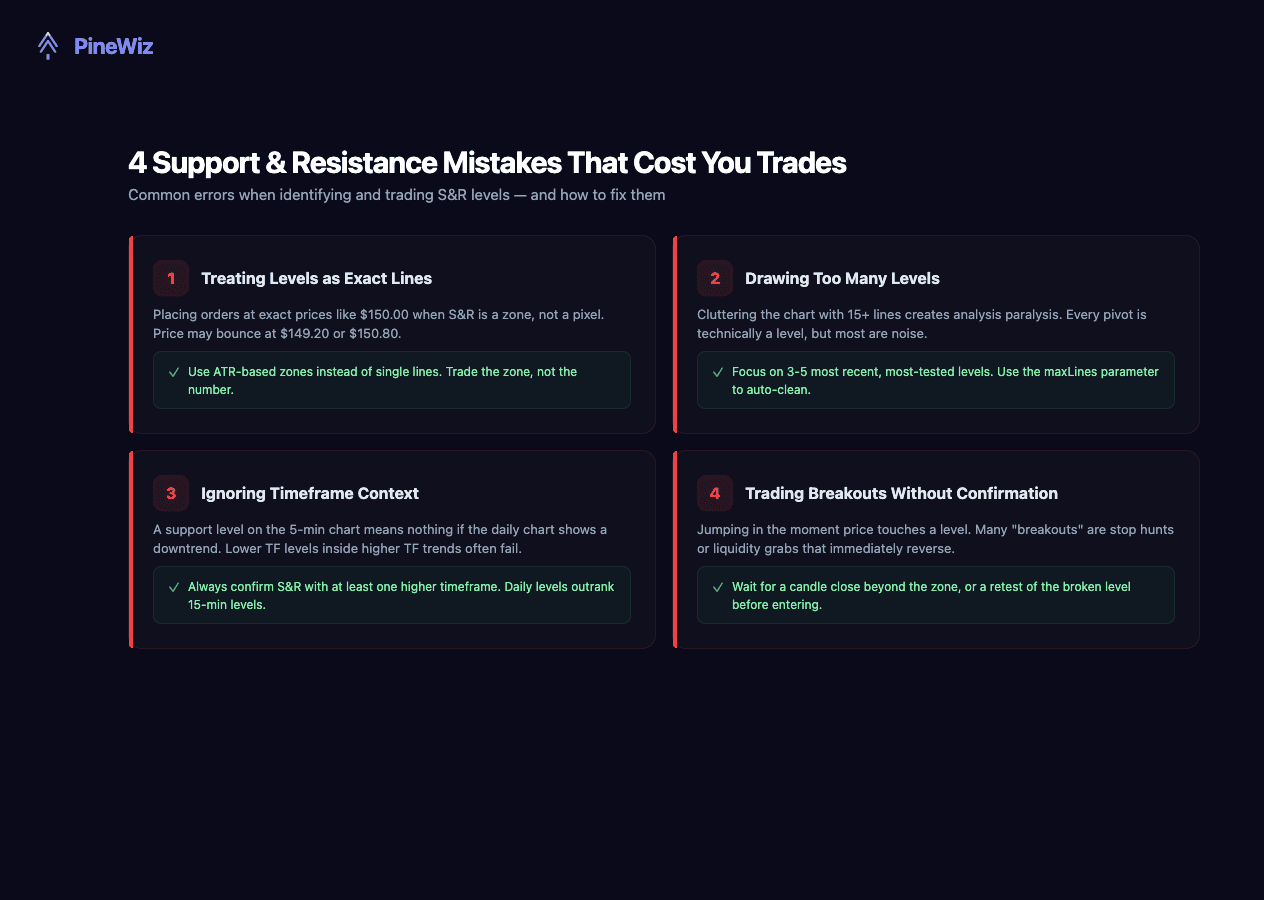
- Treating zones as exact prices. If your indicator shows support at $150.00, don't place a limit order at exactly $150.00. The zone exists for a reason — use it as an area of interest, not a pixel-perfect trigger.
- Cluttering the chart with too many levels. Every pivot is technically a level, but drawing 20 lines creates analysis paralysis. Focus on the 3-5 most recent, most tested levels.
- Ignoring the higher timeframe. A support level on the 5-minute chart means almost nothing if the daily chart shows a freefall. Always check structure on at least one higher timeframe.
- Trading breakouts without confirmation. Not every move above resistance is real. Some are stop hunts. Wait for a candle close above the level, or a retest of the broken level before entering.
How to Backtest Your S&R Indicator
Scroll back 100+ bars and observe how price interacted with the auto-detected levels. Count how many times price bounced off a zone versus broke through. A good indicator should show a bounce rate of 60-70% on the most recent levels.
Check if the breakout alerts fired at actionable moments — not in the middle of a wick that immediately reversed. Compare your indicator's levels against manually drawn S&R. If they roughly match, the algorithm is capturing what experienced traders see.
Build Your Support & Resistance Indicator Without Code
Understanding pivot detection and zone calculation matters — but coding it all by hand is time-consuming, especially when you want features like multi-timeframe analysis or volume-weighted levels.
PineWiz lets you describe exactly what you want in plain English: "Build an indicator that detects support and resistance zones using pivot highs and lows with a 10-bar lookback, draws zones using ATR-based width, and alerts on breakouts." PineWiz generates the complete Pine Script, ready to paste into TradingView.
Need to tweak it? Just say "Add a volume filter so only high-volume pivots are shown" or "Color the zones based on how many times they've been tested." PineWiz handles the code — you focus on the logic.
PineWiz Team
The PineWiz team specializes in Pine Script and algorithmic trading. We build AI tools that help retail traders turn their ideas into production-ready TradingView strategies and indicators — no coding required.
Ready to bring your idea to life?
Turn your trading ideas into Pine Script code without writing a single line.
Start Building