Pine Script Webhook Alerts: From Strategy Signal to Live Broker
Wire any Pine Script strategy to a live broker via webhook — JSON payloads, alert syntax, and the gotchas that silently kill live signals.
You backtested the strategy. The equity curve looks clean. You set up the alert. Then you sit there at the chart, watching for the trigger to fire so you can manually copy the trade into your broker. That is not automation. That is babysitting.
The webhook is the missing piece. TradingView fires an HTTP POST when the alert triggers, your broker (or a bridge service) accepts the payload, and the position opens automatically. The full loop runs without you. This guide walks through it end-to-end: alert syntax, JSON payloads broker-by-broker, the four silent killers that destroy live signals, and how to test the loop before you trust it with real money.
The Webhook Flow in 90 Seconds
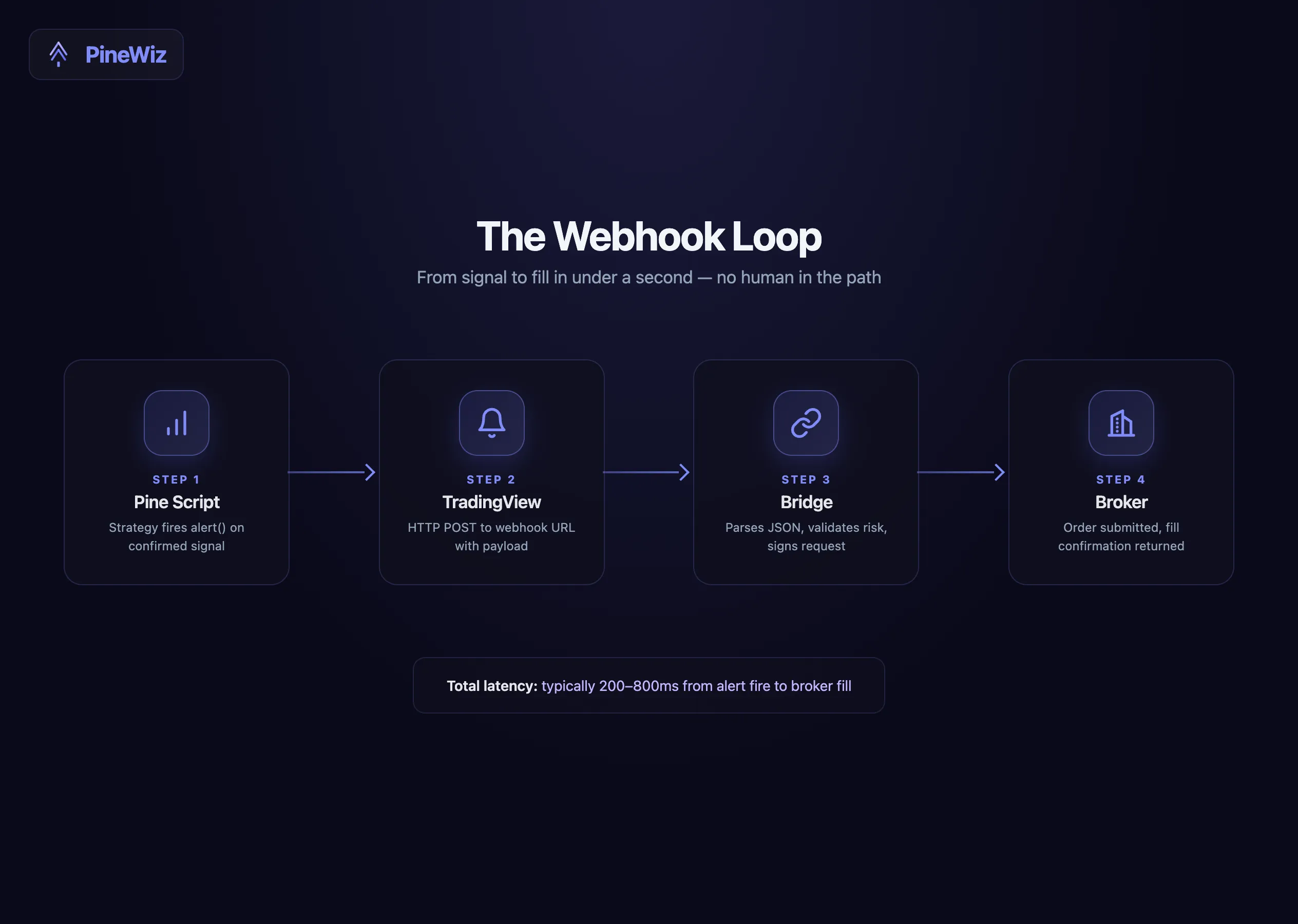
When a Pine Script alert() or alertcondition() fires, TradingView checks the alert configuration. If a webhook URL is set, TradingView POSTs the alert message body to that URL. The body is whatever string you put in the alert function.
The receiver — your broker's API endpoint, or a bridge service like 3Commas, Alertatron, or a custom serverless function — parses that string, validates it, and submits an order.
The four pieces, end to end:
- The Pine Script strategy fires
alert()on a trigger - TradingView sends an HTTP POST to your webhook URL with the alert message as the body
- The receiver parses JSON and submits an order to the broker
- The broker responds with a fill confirmation
Every link in this chain has a silent-killer mode. We cover all four below.
Alert Syntax in Pine Script
There are three ways to fire an alert from a Pine Script strategy. They behave very differently.
alertcondition() is the legacy approach. Define one condition per alert; the user creates the alert manually in TradingView's alert dialog. Limited message templating.
//@version=6
indicator("Alertcondition Example", overlay=true)

longSignal = ta.crossover(close, ta.sma(close, 20))
alertcondition(longSignal, "Long Entry", "Buy {{ticker}} at {{close}}")
alert() is the modern approach. Fires from inside an if block, supports dynamic message construction with str.tostring(), integrates cleanly with strategy scripts.
//@version=6
strategy("Alert Example", overlay=true)

longSignal = ta.crossover(close, ta.sma(close, 20))

if longSignal
    strategy.entry("Long", strategy.long)
    alert('{"action": "buy", "ticker": "' + syminfo.ticker + '", "price": ' +
          str.tostring(close) + '}', alert.freq_once_per_bar_close)
Strategy alerts are auto-fired by strategy.entry() and strategy.exit() if the alert is configured to track them. The message uses TradingView's built-in placeholders ({{strategy.order.action}}, {{strategy.order.contracts}}, {{strategy.position_size}}).
For automated trading, use alert() inside the strategy block. You get full control over the JSON payload and exact firing conditions.
Building the JSON Payload
Most webhook receivers expect JSON. The structure depends on your broker or bridge.
Generic format (works with most bridges):
alert('{"action": "buy", "ticker": "' + syminfo.ticker +
      '", "qty": 1, "price": ' + str.tostring(close) +
      ', "stop": ' + str.tostring(close * 0.98) +
      ', "limit": ' + str.tostring(close * 1.04) + '}',
      alert.freq_once_per_bar_close)
Alpaca (US stocks/crypto):
alert('{"symbol": "' + syminfo.ticker +
      '", "qty": 1, "side": "buy", "type": "market", "time_in_force": "gtc"}',
      alert.freq_once_per_bar_close)
OANDA (forex):
alert('{"order": {"units": 1000, "instrument": "' + syminfo.ticker +
      '", "type": "MARKET", "positionFill": "DEFAULT"}}',
      alert.freq_once_per_bar_close)
Bybit (crypto perps):
alert('{"category": "linear", "symbol": "' + syminfo.ticker +
      '", "side": "Buy", "orderType": "Market", "qty": "0.01"}',
      alert.freq_once_per_bar_close)
These are starting points. Each broker has authentication requirements (API keys, signatures) that you typically handle in a bridge service rather than directly in the Pine Script payload — the script never sees secrets, only the bridge does.
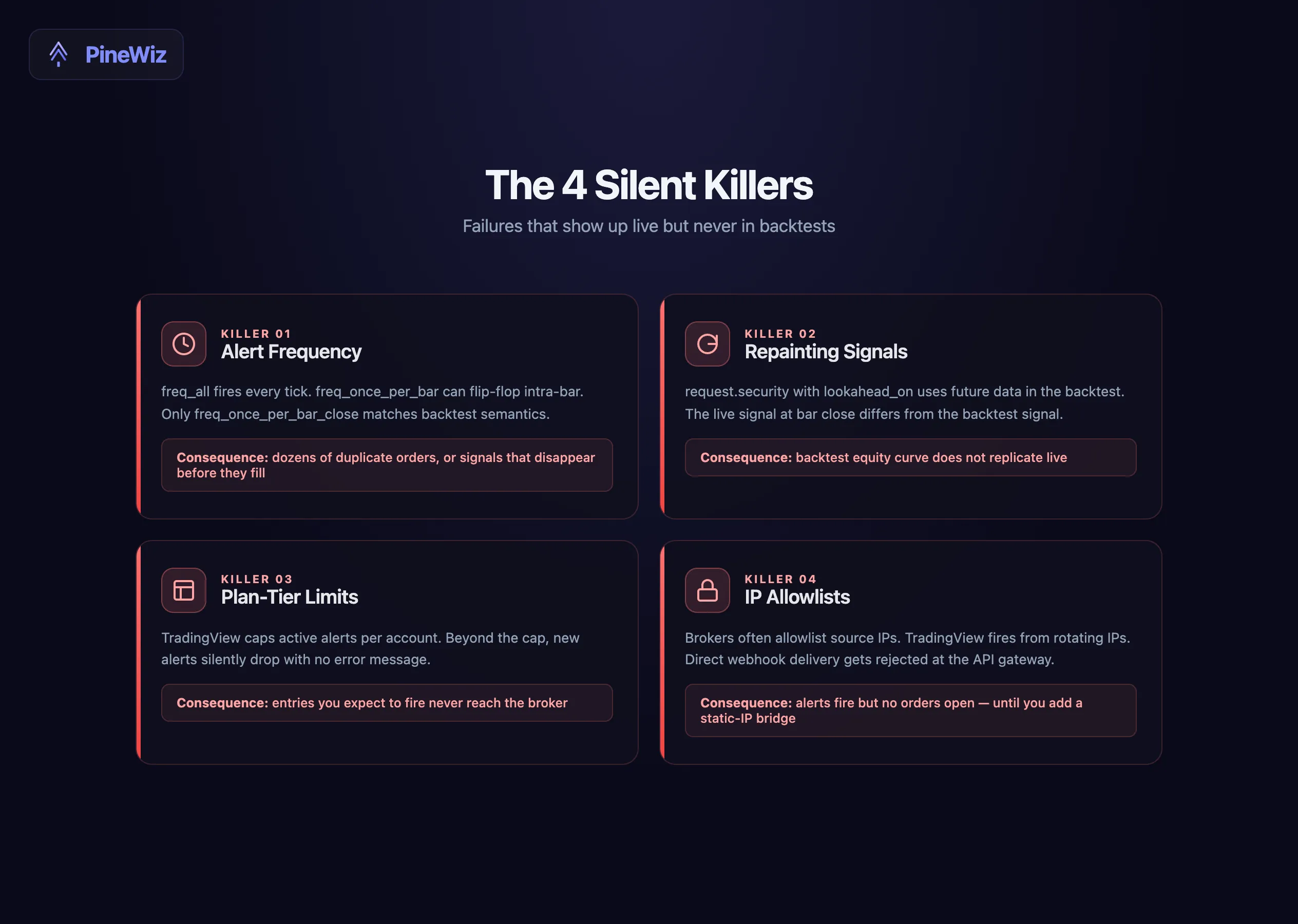
The Four Silent Killers
These are the failures that show up in live trading but never in backtests. They are why most strategies that look profitable on the Strategy Tester fail to replicate live.
1. Alert Frequency
alert.freq_once_per_bar_close fires once when the bar closes. Safe but laggy — your signal lands one bar after the trigger condition forms.
alert.freq_once_per_bar fires the first time the condition is true on an open bar. Faster but the signal can flip-flop if the condition turns false again before close.
alert.freq_all fires every tick the condition is true. Almost always wrong — it produces dozens of duplicate orders.
For most strategies, once_per_bar_close is the only safe choice. Your backtest assumes bar-close logic; matching that in the alert prevents drift.
2. Repainting Signals
If your strategy uses any function that recalculates on bar close — request.security() with lookahead_on, certain ta.* functions in unexpected contexts — the live signal will not match the backtest. The bar that triggered the alert at close may produce a different signal one tick later.
The fix: only fire alerts on confirmed conditions, ideally on the prior bar's close. Use barstate.isconfirmed as a guard.
if longSignal and barstate.isconfirmed
    alert('{"action": "buy"}', alert.freq_once_per_bar_close)
This guarantees the alert only fires after the bar that produced the signal is fully closed and final.
3. Plan-Tier Limits
TradingView's plan tiers cap how many active alerts you can run at once — a single alert on the entry tier, scaling up to hundreds on the premium tiers. If you run a multi-symbol or multi-timeframe strategy, you can hit the cap fast.
Beyond the cap, alerts silently drop. There is no error message — the alert just does not exist. Always count your active alerts against your plan limit.
4. IP Allowlists
Most broker APIs require allowlisting the source IP of incoming webhook traffic. TradingView fires alerts from a rotating set of IP addresses — 52.89.214.238, 34.212.75.30, 54.218.53.128, 52.32.178.7 are the documented ones, but they change.
If your broker only accepts webhooks from a static IP, you need a bridge service. The bridge accepts TradingView's webhook on its public endpoint, then submits the order from your allowlisted server IP.
Testing the Loop Before Going Live
Never wire a webhook directly to your live broker until you have validated the loop. The cheap way: use webhook.site or ngrok as a man-in-the-middle test.
With webhook.site:
- Visit webhook.site, copy the unique URL
- Set that URL as the webhook in your TradingView alert
- Trigger the alert manually (paper trade, or wait for a real signal)
- Inspect the received payload at webhook.site — verify JSON structure, field names, values
With ngrok (for testing your own bridge code):
- Run your bridge locally on
localhost:5000 - Run
ngrok http 5000to get a public URL - Set that URL as the webhook
- Watch your bridge logs as alerts fire — verify parsing, validation, broker API calls
Only after the test loop produces correct payloads and your bridge handles them correctly should you swap in the live broker URL.
Adding Risk Management at the Webhook Layer
Pine Script can fire signals, but it cannot enforce account-level risk. Daily loss limits, max open positions, equity-based position sizing — these need to live at the bridge layer.
A minimal bridge in Python:
from flask import Flask, request, jsonify
import broker_api

app = Flask(__name__)
DAILY_LOSS_LIMIT = -300
MAX_OPEN_POSITIONS = 3

@app.post("/webhook")
def webhook():
    payload = request.get_json()
    if broker_api.daily_pnl() < DAILY_LOSS_LIMIT:
        return jsonify({"status": "blocked", "reason": "daily loss limit"})
    if broker_api.open_positions() >= MAX_OPEN_POSITIONS:
        return jsonify({"status": "blocked", "reason": "max positions"})
    result = broker_api.submit_order(payload)
    return jsonify({"status": "ok", "order_id": result["id"]})
The bridge is the right place to enforce these. The Pine Script knows the strategy logic; the bridge knows the account state.
From Strategy to Live Webhook in One Flow
The full pipeline assumes you already have a backtested strategy. If you do not — if you are starting from an indicator and need to convert it first — that conversion process is documented in the indicator-to-strategy guide. It walks through the six steps that turn a paint-only indicator into a backtestable strategy with proper exits, risk management, and alert wiring.
Once the strategy backtests cleanly, the webhook layer is straightforward — the JSON templates above slot directly into the alert blocks.
Build the Strategy and Wire the Alerts in One Step
The manual route is: write the strategy, debug it, add alerts, format the JSON, test the webhook, deploy. That is a long path with many failure points.
The faster route: describe the strategy and the alert payload together in PineWiz. "Build a strategy that buys when RSI crosses below 30 and price is above the 200 EMA, with a 2% stop and 4% target. Fire a webhook alert with action, ticker, and price for every entry." You get the full strategy plus alert wiring in one prompt.
The same applies to any of the SMC strategies covered in our order block, liquidity sweep, and FVG template guides. Generate the strategy, generate the alerts, paste both into TradingView, point the webhook at your bridge. From idea to live broker automation in under five minutes.
PineWiz Team
The PineWiz team specializes in Pine Script and algorithmic trading. We build AI tools that help retail traders turn their ideas into production-ready TradingView strategies and indicators — no coding required.
Ready to bring your idea to life?
Turn your trading ideas into Pine Script code without writing a single line.
Start Building